Building Privacy-Aware Pipelines with Tabular: From Detection to Action

Finding PII is just the beginning. The real question: what do you do with it?
We've all been there. You run a PII scan, find sensitive data scattered across your tables, and then... what? Print a report? Hope nobody asks?
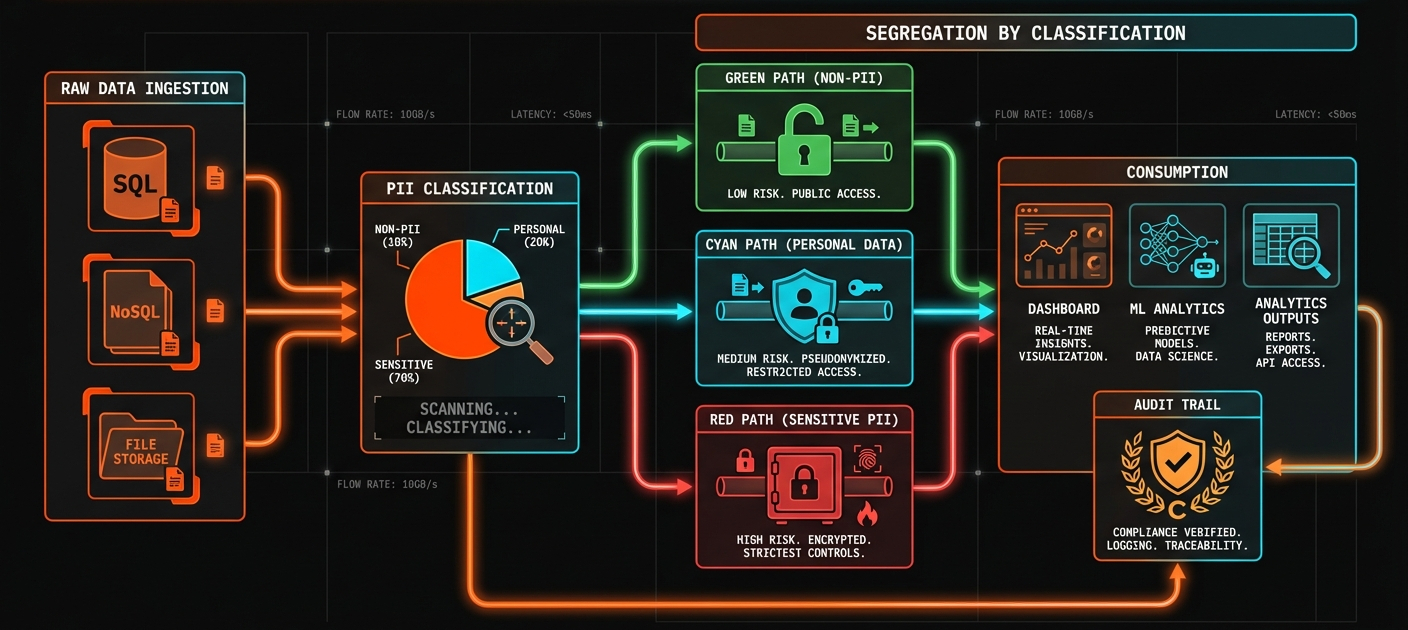
A production privacy workflow needs more than detection. It needs a complete pipeline:
Ingest → Classify → Mask → Serve
Let's build each piece.
Classification: Sorting Data by Risk
Here's the problem: not all PII is equally sensitive.
A single SSN or credit card number is far more dangerous than ten email addresses. Classification should reflect the type of PII found, not how many instances exist.
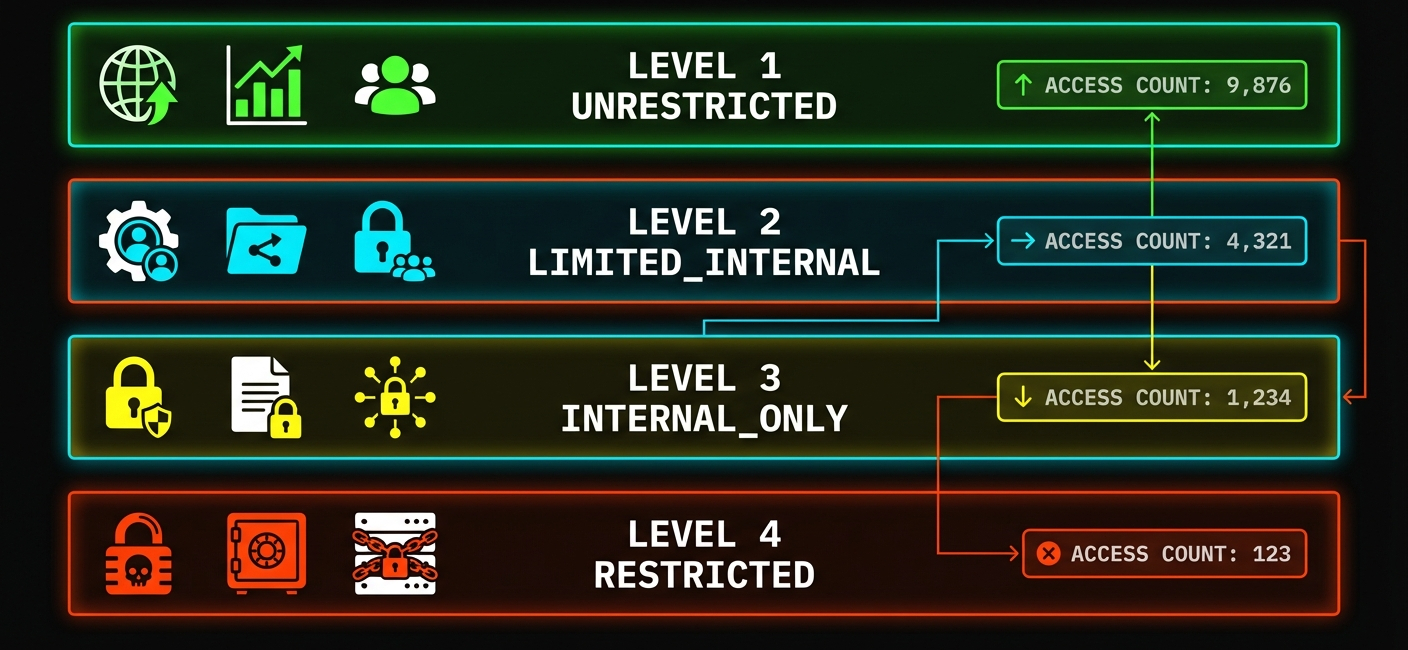
We classify records by the most sensitive PII type detected:
CREATE TABLE support_tickets_classified AS
SELECT
  *,
  pii_detect(content) as detected_pii,
  CASE
    WHEN detected_pii::VARCHAR LIKE '%SSN%'
      OR detected_pii::VARCHAR LIKE '%CREDIT_CARD%'
      OR detected_pii::VARCHAR LIKE '%BANK_ACCOUNT%'
      THEN 'RESTRICTED'
    WHEN detected_pii::VARCHAR LIKE '%NAME%'
      OR detected_pii::VARCHAR LIKE '%EMAIL%'
      OR detected_pii::VARCHAR LIKE '%PHONE%'
      THEN 'INTERNAL_ONLY'
    WHEN pii_count(content) > 0
      THEN 'LIMITED'
    ELSE 'UNRESTRICTED'
  END as classification
FROM support_tickets;

-- Check the distribution
SELECT classification, COUNT(*) as records
FROM support_tickets_classified
GROUP BY classification;
One SSN? RESTRICTED. Ten emails but no financial data? INTERNAL_ONLY. The classification matches the actual risk.
Masking Strategies: Different Outputs for Different Audiences
Once data is classified, you need to decide how to share it. Different consumers need different levels of access.
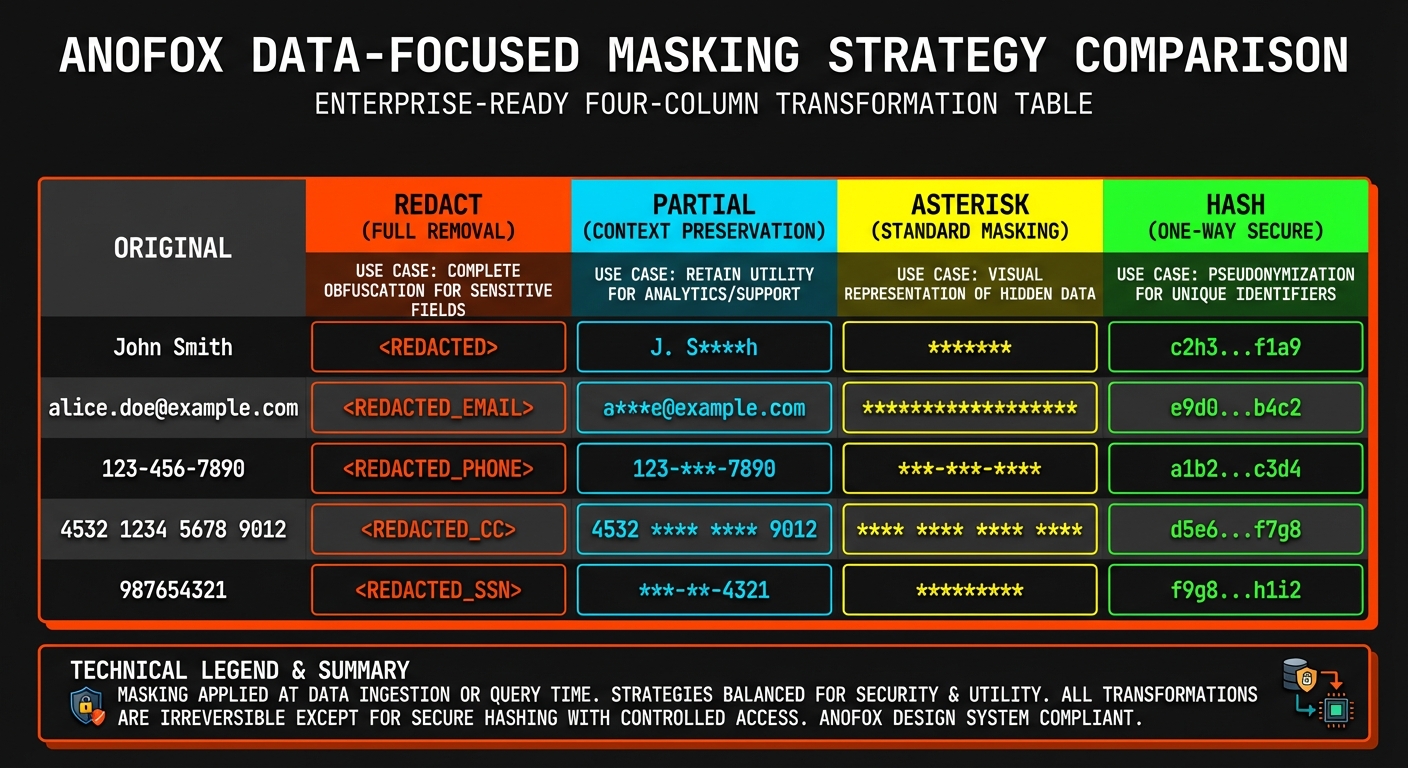
We built four masking strategies, each optimized for a specific use case:

| Strategy | Output | Best For |
|---|---|---|
redact | [EMAIL] | Dashboards, external reports |
partial | j***@example.com | Internal debugging |
asterisk | ****@*******.*** | Logs, audit trails |
hash | a1b2c3... | ML training (preserves relationships) |
The hash option is particularly useful for machine learning. It's deterministic—the same input always produces the same hash—so you can still join tables and track patterns without exposing the actual values.
-- Dashboard-safe version (no PII visible)
CREATE TABLE tickets_dashboard AS
SELECT
  ticket_id,
  pii_mask(content, 'redact') as content,
  created_at
FROM support_tickets;

-- ML-safe version (deterministic hashing enables joins)
CREATE TABLE tickets_ml AS
SELECT
  ticket_id,
  pii_mask(content, 'hash') as content,
  md5(customer_id) as customer_hash
FROM support_tickets;
Governance: Who Sees What
Classification and masking set up the data. Governance defines the rules.
The goal is simple: make it impossible for the wrong person to see the wrong data. A junior analyst shouldn't see RESTRICTED records. A dashboard shouldn't display unmasked PII.
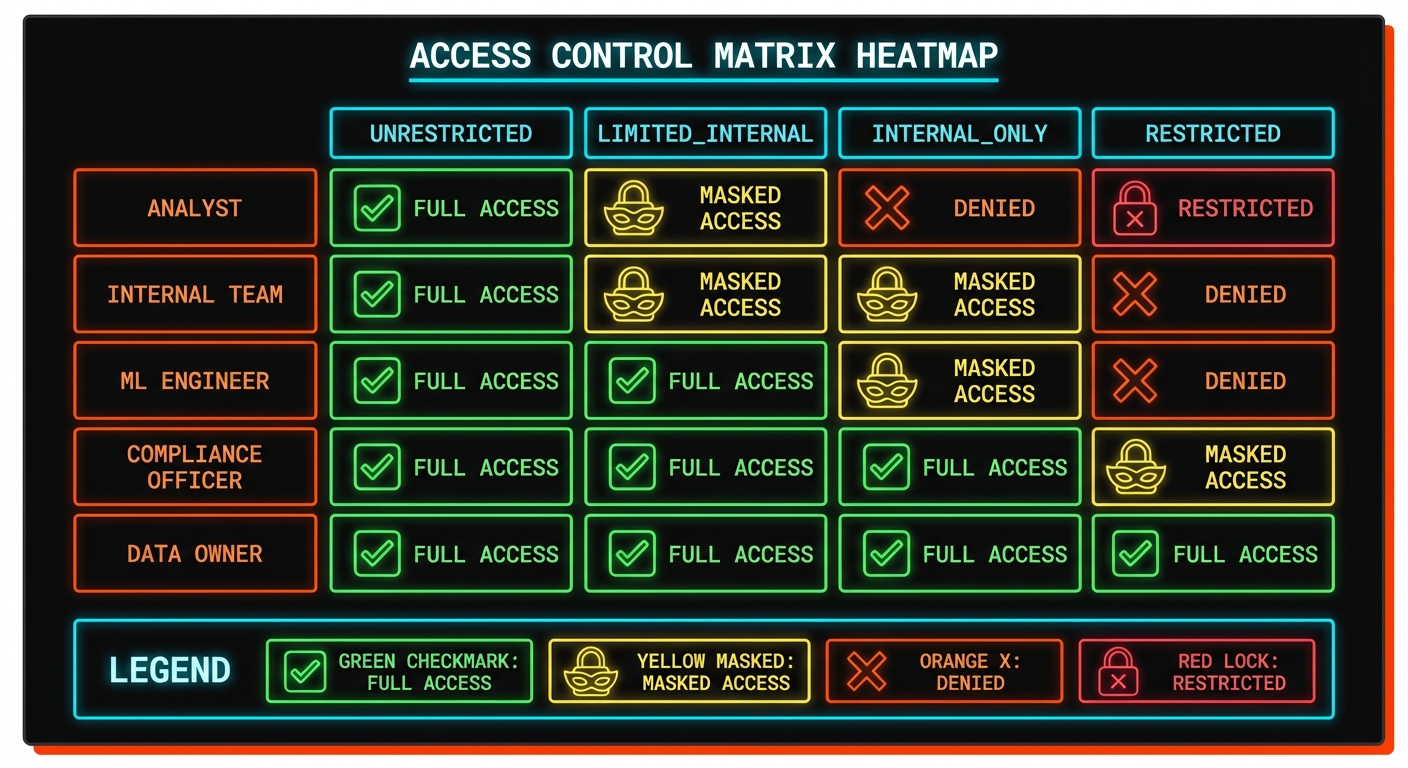
We define policies that map roles to maximum classification levels:
CREATE TABLE access_policies (
  role VARCHAR,
  max_classification VARCHAR
);

INSERT INTO access_policies VALUES
  ('analyst', 'UNRESTRICTED'),
  ('internal', 'LIMITED'),
  ('ml_engineer', 'INTERNAL_ONLY'),
  ('compliance', 'RESTRICTED');
Your application layer enforces these rules. When a user queries data, check their role against the classification. If they're asking for something above their level, deny the request or return the masked version.
Tools like flapi can enforce these policies at the API layer. With JWT authentication and row-level security built in, you can restrict which endpoints each role can access. And flapi's MCP support means the same rules apply when AI agents query your data—no separate security model needed.
Monitoring: Catching Problems Early
Pipelines drift. New data sources get added. Fields change meaning. What was clean last month might be full of PII today. Without monitoring, you won't know until an audit—or worse, a breach.
We run a daily compliance check:
SELECT
  'support_tickets' as table_name,
  COUNT(*) as total_rows,
  SUM(CASE WHEN pii_contains(content) THEN 1 ELSE 0 END) as rows_with_pii,
  ROUND(100.0 * SUM(CASE WHEN pii_contains(content) THEN 1 ELSE 0 END) / COUNT(*), 1) as pii_pct
FROM support_tickets
WHERE created_at > CURRENT_DATE - INTERVAL '1 day';
If yesterday's data suddenly shows 40% PII when the historical average is 15%, something changed. Maybe a new integration is dumping unmasked customer data. Maybe a field got repurposed. Either way, you catch it before it becomes a problem.
Try It Yourself
Here's the workflow in three steps:
LOAD anofox_tabular;

-- 1. Classify your data
SELECT
  pii_count(text_column) as pii_count,
  CASE WHEN pii_count(text_column) > 3 THEN 'HIGH' ELSE 'LOW' END as risk
FROM your_table
LIMIT 10;

-- 2. Create a masked version
CREATE TABLE your_table_safe AS
SELECT
  id,
  pii_mask(text_column, 'redact') as text_column
FROM your_table;

-- 3. Monitor daily
SELECT COUNT(*) FILTER (WHERE pii_contains(text_column))
FROM your_table
WHERE created_at > CURRENT_DATE;
Start with classification to understand what you have. Create masked views for different audiences. Monitor to catch drift.
This wraps up the PII detection series:
- SQL-Native PII Detection — What it does and how it works
- Privacy Pipelines — How to integrate it into production
All of this runs in SQL. No external services, no data movement, no per-record costs. Just queries.