Git Branches for Your Database: What-If Analysis in DuckDB Without Copying Tables
Every analyst has written this line. Nobody is proud of it.
CREATE TABLE sales_promo_v2_FINAL AS SELECT * FROM sales;
There is a better move. Branch the table instead:
CALL scenario_create('promo_q2');
ATTACH 'promo_q2' AS promo (TYPE scenario);

UPDATE promo.sales SET quantity = quantity * 1.25 WHERE product_id = 'product_1';
sales is untouched. promo.sales shows the what-if. Nothing was copied.
The Problem: What-If Analysis Has No Good Home
The request is always some flavour of the same thing:
"What does Q2 look like if we run the promo on product_1? Keep the current numbers too — the board wants both."
You need two versions of one table at the same time. SQL gives you three ways to do that, and all three are bad.
Copy the table. CREATE TABLE ... AS SELECT. Works instantly, and it's why every warehouse has a sales_v2, a sales_promo, and a sales_promo_final_v3 that nobody can delete because nobody remembers which report reads it. Storage doubles per scenario. When the base data refreshes, every copy silently goes stale.
Add a scenario column. Now sales has a scenario_id, and every query in your codebase needs a WHERE scenario_id = ... that someone will forget. Your primary key changes. Your dashboards change. A modelling question became a schema migration.
Do it in the application. Pull into pandas, mutate, push back. Now the truth lives in a notebook, and the answer isn't reproducible next quarter.
None of these are what you actually want. What you want is a branch: the original stays put, you make changes in an isolated world, you compare the two, and you either keep the changes or throw them away.
Version control solved this for code in 2005. It's oddly absent from analytics.
Branching, but for Tables
anofox_scenario is a DuckDB extension that adds exactly that. A scenario is a named branch over your existing tables:
INSTALL anofox_scenario FROM community;
LOAD anofox_scenario;
The mechanism is copy-on-write. Creating a scenario copies no rows at all — it writes a little metadata. When you modify a row inside the scenario, only that row is stored, in a per-scenario delta table. When you read, the extension merges the delta over the base on the fly.
So a scenario over a 100-million-row table where you changed 500 rows costs you 500 rows. Not 100 million.
The important consequence isn't storage though. It's that the base table is never written to. Not "by convention" — structurally. There is no code path from a scenario write to a base table.
Let's Actually Do It
We'll use the sales table from the anofox_forecast Getting Started guide — three products, 100 days of daily quantities. The setseed() call makes the random values reproducible, so the numbers below are the numbers you'll get.
SELECT setseed(0.42);

CREATE TABLE sales AS
SELECT
    'product_' || (i % 3) AS product_id,
    '2024-01-01'::DATE + (i * INTERVAL '1 day') AS date,
    100.0 + (i % 7) * 10 + random() * 5 AS quantity
FROM generate_series(0, 99) AS t(i);
Here's what we start with:
SELECT product_id, count(*) AS days, round(avg(quantity),1) AS avg_qty
FROM sales GROUP BY 1 ORDER BY 1;
| product_id | days | avg_qty |
|---|---|---|
| product_0 | 34 | 132.7 |
| product_1 | 33 | 132.3 |
| product_2 | 33 | 131.5 |
Step 1: Create the branch
CALL scenario_create('promo_q2', 'product_1 promo from March',
                     key_columns := MAP {'sales': ['product_id','date']});
That key_columns argument deserves a word. To track a row change, the extension needs to know what identifies a row. Most tables tell it via a PRIMARY KEY. Ours was built with CREATE TABLE AS, so it has none — we declare the identity instead. Skip this on a keyless table and UPDATE still works, but you lose row-level diffing, because there's no way to say which row changed.
Step 2: Attach it
ATTACH 'promo_q2' AS promo (TYPE scenario);
This is the whole user interface. The scenario is now a catalog, like any attached database. Every base table appears inside it.
Step 3: Edit it with ordinary SQL
UPDATE promo.sales SET quantity = quantity * 1.25
WHERE product_id = 'product_1' AND date >= DATE '2024-03-01';
No special function. No _op column. No delta table to write by hand. INSERT, UPDATE, DELETE, TRUNCATE, MERGE INTO, ON CONFLICT, RETURNING — all of it works, because the scenario is a real catalog and DuckDB's planner treats it as one.
Step 4: Both worlds at once
SELECT 'base' AS world, round(avg(quantity),1) AS avg_qty
FROM sales WHERE product_id = 'product_1'
UNION ALL
SELECT 'promo', round(avg(quantity),1)
FROM promo.sales WHERE product_id = 'product_1';
| world | avg_qty |
|---|---|
| base | 132.3 |
| promo | 145.4 |
Both numbers, one query, one database file. That join across worlds is the thing copies can never give you cleanly.
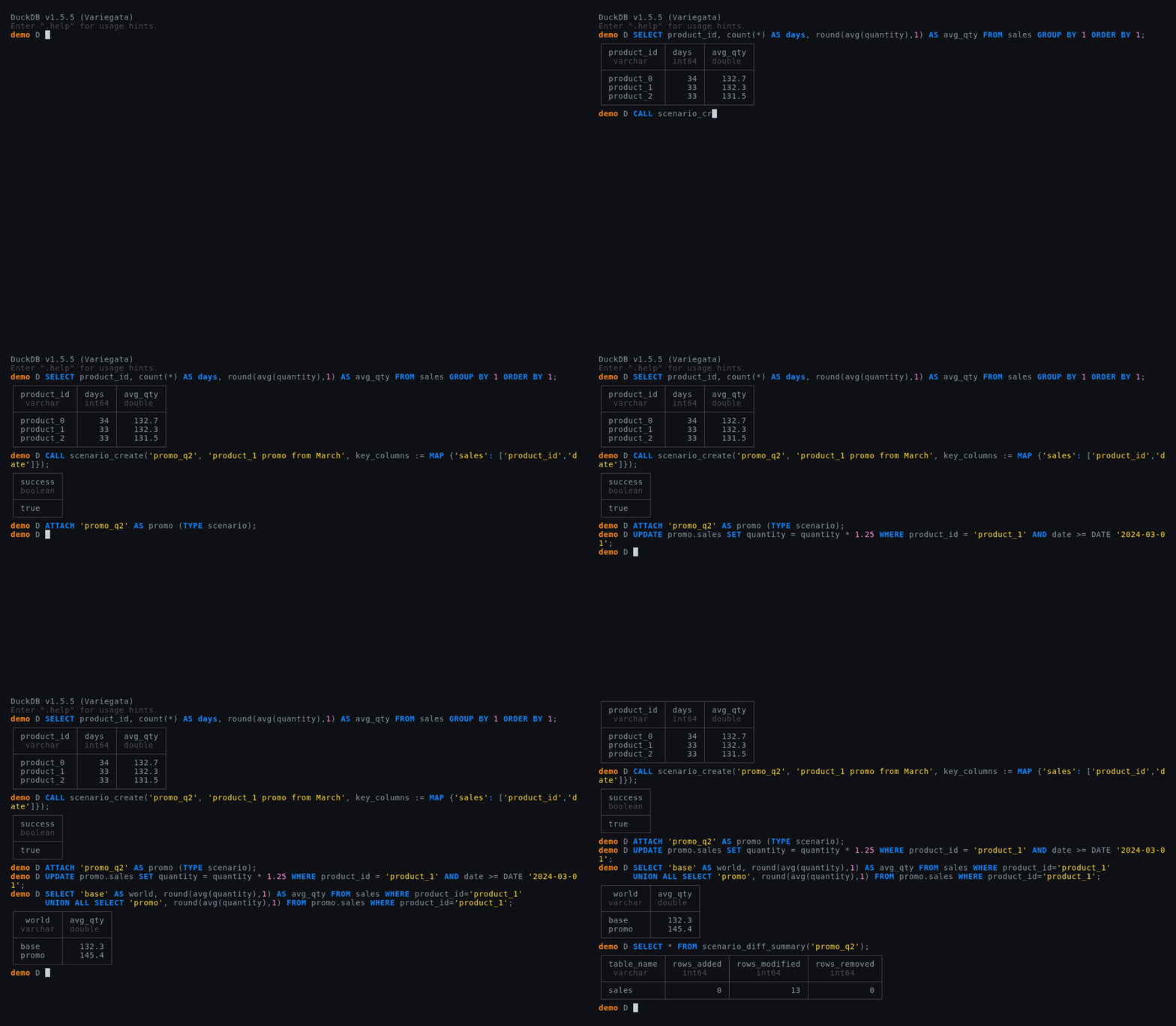
Here is the whole sequence as a real session — real extension, real output, nothing staged:
What Changed? Ask the Database
With copies, "what's different between these two tables?" is a FULL OUTER JOIN you write by hand, get subtly wrong, and rewrite for the next table. Here it's a function, because the extension already stored precisely the changed rows:
SELECT * FROM scenario_diff_summary('promo_q2');
| table_name | rows_added | rows_modified | rows_removed |
|---|---|---|---|
| sales | 0 | 13 | 0 |
Thirteen rows changed. Want them individually?
SELECT * FROM scenario_diff('promo_q2', 'sales') ORDER BY date DESC LIMIT 3;
| product_id | date | change_type | column_name | old_value | new_value |
|---|---|---|---|---|---|
| product_1 | 2024-04-07 00:00:00 | modified | quantity | 163.926… | 204.908… |
| product_1 | 2024-04-04 00:00:00 | modified | quantity | 133.511… | 166.889… |
| product_1 | 2024-04-01 00:00:00 | modified | quantity | 101.066… | 126.332… |
Column-level, with old and new values. And it streams through the engine, so you can filter and aggregate it like any table:
SELECT count(*) FROM scenario_diff('promo_q2','sales') WHERE change_type = 'modified';
You can also diff two scenarios against each other — scenario_diff('promo_q2', 'promo_aggressive', 'sales') — which is how you answer "how do our two proposals differ?" without materialising either.
Branches of Branches
A scenario can branch off another scenario, inheriting its changes:
CALL scenario_create('promo_aggressive', from_scenario := 'promo_q2');
SELECT name, mode, frozen, parent FROM scenario_list();
| name | mode | frozen | parent |
|---|---|---|---|
| promo_q2 | delta | false | NULL |
| promo_aggressive | delta | false | promo_q2 |
Baseline → moderate → aggressive, each one only storing its own increment. This is where the git analogy stops being a metaphor and starts being the actual data model.
Freezing: When a Number Must Stop Moving
Planning numbers get approved. Approved numbers must not drift.
CALL scenario_freeze('promo_q2');
UPDATE promo.sales SET quantity = 1;
Invalid Input Error: Cannot UPDATE: scenario 'promo_q2' is frozen.
Unfreeze it with CALL scenario_unfreeze('promo_q2')
Reads keep working; writes are refused. Combine mode := 'materialized' with a freeze and you get a genuine immutable snapshot — a full copy, pinned, unaffected by anything that happens to the base afterwards.
That last part matters more than it sounds, so let's be precise about it.
The One Decision You Have to Make
Scenarios come in three isolation tiers, and picking wrong is the one way to get a surprising answer:
| Mode | Created with | Later changes to the base… | Cost |
|---|---|---|---|
| Delta (default) | scenario_create('s') | …show through, except on rows the scenario already changed | Metadata only |
| Materialized | mode := 'materialized' | …are invisible. Fully isolated | Copies every base table |
| DuckLake snapshot | base := '<attached lake>' | …are invisible. Reads pinned to creation time | No copy |
The default is a live overlay. That's usually what you want — a short-lived what-if against a base nobody is editing right now, and if a colleague fixes a data error you'd rather see the fix. But if the scenario is an approved plan you'll be audited on in six months, use materialized. Reproducibility beats freshness there.
Keeping the Changes
If the what-if wins, promote it. Look before you leap:
SELECT * FROM scenario_merge_preview('promo_q2');
| table_name | key | action | conflict |
|---|---|---|---|
| sales | product_1|2024-03-02 00:00:00 | update | false |
| sales | product_1|2024-03-05 00:00:00 | update | false |
| … | … | … | … |
Thirteen planned actions, no conflicts. Apply them:
SELECT * FROM scenario_merge('promo_q2');
| tables_changed | rows_applied | conflicts_resolved |
|---|---|---|
| 1 | 13 | 0 |
SELECT round(avg(quantity),1) AS base_after FROM sales WHERE product_id = 'product_1';
| base_after |
|---|
| 145.4 |
The base moved from 132.3 to 145.4, and the scenario ended up frozen with an empty delta — its changes now live in the base, so it becomes a record of what was applied rather than a thing you can keep editing.
If someone changed the base underneath you, on_conflict decides: abort (default) refuses, ours lets the scenario win, theirs keeps the base.
And if the what-if loses? CALL scenario_drop('promo_q2'); The branch disappears. The base never knew.
What It Won't Do
Worth knowing before you build on it:
- No DDL inside a scenario. You can't
ALTER TABLEin a branch. Schema changes go to the base, thenscenario_refresh()picks up new tables. This is a deliberate design limit, not a gap. - Single writer. Host writes and scenario writes can't share one explicit transaction. It inherits DuckDB's concurrency model.
- Keyless tables are second-class. Without a
PRIMARY KEYor declaredkey_columns, you getUPDATE/DELETEwith bag semantics but noscenario_diff. - Delta mode is an overlay, not a snapshot. See the table above. This is the one that surprises people.
The Part That Actually Changes Your Workflow
Everything so far treats a scenario as a place to put numbers. The interesting bit is that a scenario is a normal catalog — which means anything that takes a table name can point at one.
Including a forecaster:
SELECT * FROM ts_forecast_by('promo.sales', product_id, date, quantity, 'AutoETS', 7, '1d');
That's anofox_forecast generating a forecast of a world that doesn't exist, from data that was never copied. Same query as forecasting the real table — one word different.
Next post: Forecast the What-If, Not the Copy →
anofox_scenario is available in the DuckDB Community Extensions repository: INSTALL anofox_scenario FROM community;. Source, docs, and the full API reference are on GitHub.