Forecast the What-If, Not the Copy: Scenario Branches Meet Time-Series Forecasting

Two queries. One word different. Two futures.
FROM ts_forecast_by('sales',       product_id, date, quantity, 'AutoETS', 7, '1d')
FROM ts_forecast_by('promo.sales', product_id, date, quantity, 'AutoETS', 7, '1d')
The first forecasts your actual demand. The second forecasts a promotional scenario that exists nowhere on disk. Neither one copied a row.
In the last post we branched a DuckDB table with anofox_scenario: create a scenario, ATTACH it, edit it with ordinary SQL, diff it, merge it back. Copy-on-write, so nothing was duplicated.
That post ended on a claim worth unpacking. A scenario isn't a special object that only its own extension understands — it's a normal DuckDB catalog. Which means anything that accepts a table name can point at one.
Time-series forecasting is where that stops being a neat property and starts being a workflow.
Why Forecasting a What-If Is Normally Awful
Demand planning runs on questions like this:
"If we run the promo on product_1 from March, what does the next week actually look like?"
You can't answer it by scaling the forecast. A 25% demand lift doesn't produce a 25% higher forecast, because the model re-fits: trend, seasonality and level all move. The only honest answer is to forecast the modified history.
Which, without branching, means the export-and-pray loop:
- -> Copy the table, or dump to CSV
- -> Apply the promo assumption to the copy
- -> Run the forecaster on the copy
- -> Try to remember which copy was which when three of them exist
- -> Discover the base data refreshed and all three copies are stale
Every scenario multiplies the storage and the confusion. And the comparison you actually wanted — base forecast next to scenario forecast — needs you to keep both around and join them by hand.
Setup: One Table, One Branch
We're using the sales table from the anofox_forecast Getting Started guide: three products, 100 days of daily quantities. setseed() keeps it reproducible, so the numbers below are the numbers you'll get.
INSTALL anofox_scenario FROM community;  LOAD anofox_scenario;
INSTALL anofox_forecast FROM community;  LOAD anofox_forecast;

SELECT setseed(0.42);

CREATE TABLE sales AS
SELECT
    'product_' || (i % 3) AS product_id,
    '2024-01-01'::DATE + (i * INTERVAL '1 day') AS date,
    100.0 + (i % 7) * 10 + random() * 5 AS quantity
FROM generate_series(0, 99) AS t(i);
Then the promo branch, exactly as before:
CALL scenario_create('promo_q2', 'product_1 promo from March',
                     key_columns := MAP {'sales': ['product_id','date']});
ATTACH 'promo_q2' AS promo (TYPE scenario);

UPDATE promo.sales SET quantity = quantity * 1.25
WHERE product_id = 'product_1' AND date >= DATE '2024-03-01';
Thirteen rows now differ between sales and promo.sales. Nothing was copied.
The Forecast
Forecast the world as it is:
SELECT forecast_step, round(yhat,1) AS yhat, model_name
FROM ts_forecast_by('sales', product_id, date, quantity, 'AutoETS', 7, '1d')
WHERE product_id = 'product_1' AND forecast_step <= 3;
| forecast_step | yhat | model_name |
|---|---|---|
| 1 | 121.6 | AutoETS(Additive,None,Multiplicative) |
| 2 | 150.4 | AutoETS(Additive,None,Multiplicative) |
| 3 | 112.7 | AutoETS(Additive,None,Multiplicative) |
Now forecast the world as it could be. Same query. One word:
SELECT forecast_step, round(yhat,1) AS yhat, model_name
FROM ts_forecast_by('promo.sales', product_id, date, quantity, 'AutoETS', 7, '1d')
WHERE product_id = 'product_1' AND forecast_step <= 3;
| forecast_step | yhat | model_name |
|---|---|---|
| 1 | 150.6 | AutoETS(Additive,None,Multiplicative) |
| 2 | 198.2 | AutoETS(Additive,None,Multiplicative) |
| 3 | 146.1 | AutoETS(Additive,None,Multiplicative) |
Here it is happening for real — same session, both queries, no editing:
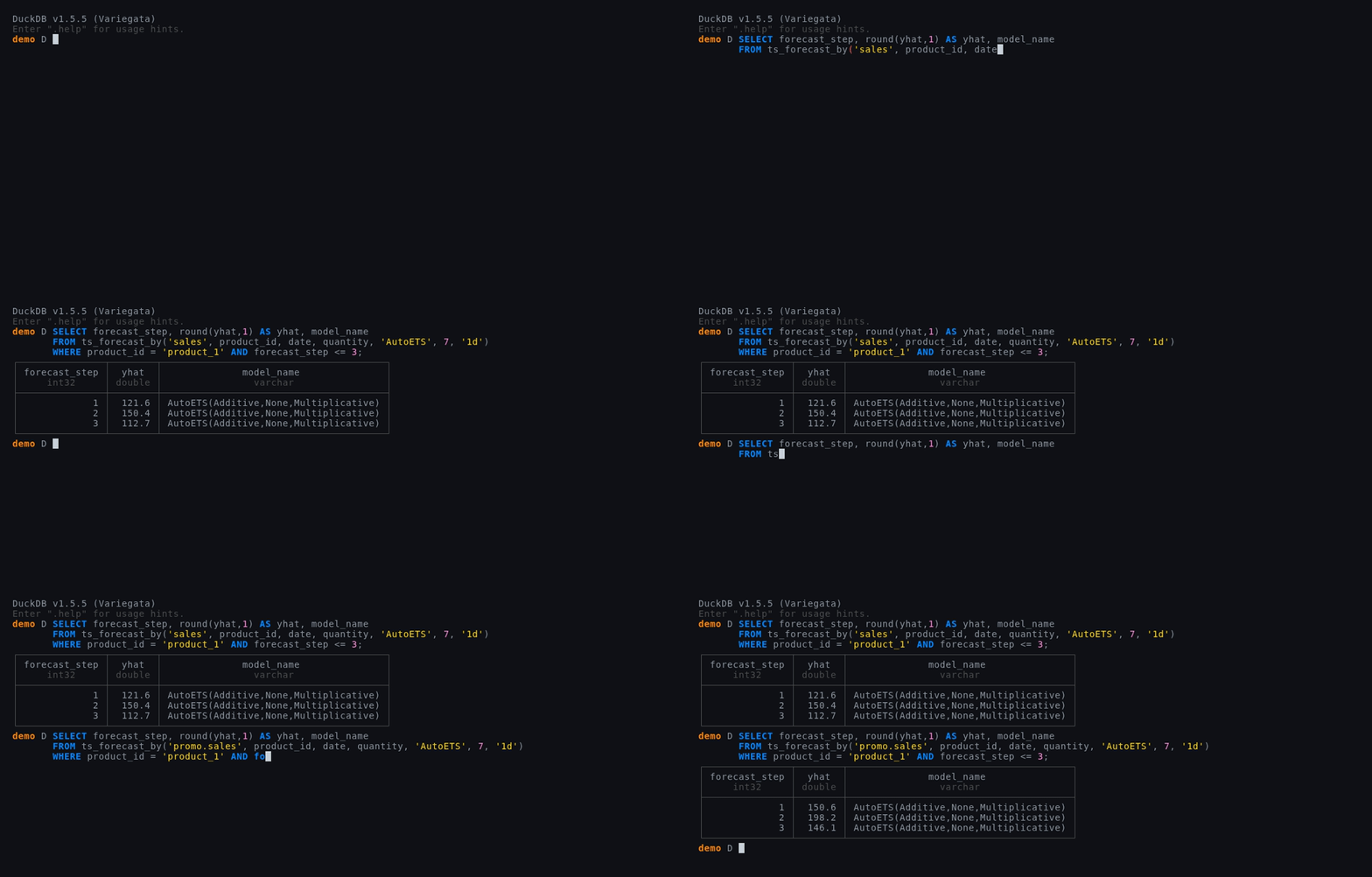
ts_forecast_by never learned what a scenario is. It asked DuckDB for a table called promo.sales, DuckDB's catalog layer produced rows, and the merge-on-read scan assembled those rows from base plus delta on the way past. The forecaster sees a table. That's the entire integration.
Read the Numbers, Not the Ratio
This is the part worth slowing down for.
We raised March-onward demand by exactly 25%. The naive expectation is a 25% higher forecast. Look at what actually came out:
| step | base | promo | lift |
|---|---|---|---|
| 1 | 121.6 | 150.6 | +23.9% |
| 2 | 150.4 | 198.2 | +31.8% |
| 3 | 112.7 | 146.1 | +29.7% |
Not 25% anywhere. The lift ranges from +23.9% to +31.8%, and it isn't monotonic.
That's the model re-fitting rather than rescaling. AutoETS re-estimated level, trend and seasonality against the modified history, and because the promo only touched March onward, it changed the shape of the recent series — not just its magnitude. The seasonal component is multiplicative here, so a level shift interacts with the weekly pattern differently at each step.
This is exactly why "just multiply the forecast by 1.25" is wrong, and exactly why you want the forecaster to see the modified history rather than a scaled output. On one product over three days it's a few percentage points. Across a planning grid of thousands of SKUs it's the difference between a plan that holds and one that doesn't.
Comparing Worlds in One Query
Because both worlds live in the same database, the comparison is just SQL — no exports to reconcile:
SELECT
    b.forecast_step,
    round(b.yhat, 1) AS base_yhat,
    round(p.yhat, 1) AS promo_yhat,
    round((p.yhat - b.yhat) / b.yhat * 100, 1) AS lift_pct
FROM ts_forecast_by('sales', product_id, date, quantity, 'AutoETS', 7, '1d') b
JOIN ts_forecast_by('promo.sales', product_id, date, quantity, 'AutoETS', 7, '1d') p
  USING (product_id, forecast_step)
WHERE b.product_id = 'product_1'
ORDER BY b.forecast_step;
One statement, two futures, joined. Try writing that against two CSV exports.
Scaling to a Real Planning Grid
Nobody plans one product. The useful shape is a scenario per assumption, each one storing only its own changes:
CALL scenario_create('promo_moderate',   key_columns := MAP {'sales': ['product_id','date']});
CALL scenario_create('promo_aggressive', from_scenario := 'promo_moderate');
CALL scenario_create('supply_shock',     key_columns := MAP {'sales': ['product_id','date']});
promo_aggressive branches from promo_moderate, inheriting its changes and adding its own — the same layering you'd do with git branches. Three scenarios over a large table cost you the rows each one touched, not three copies.
Then forecast each by name, and UNION ALL the results into one planning table. The forecaster doesn't change. Only the string does.
When the Plan Is Approved
Once a scenario becomes the plan, freeze it so the number stops moving:
CALL scenario_create('q2_approved', mode := 'materialized');
CALL scenario_freeze('q2_approved');
materialized takes a real copy, so later corrections to the base can't drift it; freeze refuses writes while keeping reads working. Together that's an auditable point-in-time record — the forecast you committed to, still queryable next quarter, in the same file.
And if the scenario should become reality:
SELECT * FROM scenario_merge('promo_q2');
| tables_changed | rows_applied | conflicts_resolved |
|---|---|---|
| 1 | 13 | 0 |
Thirteen rows applied to the base. product_1's average moves from 132.3 to 145.4, and the scenario ends frozen with an empty delta — a record of what was applied rather than something you can keep editing.
What This Composition Buys You
Neither extension knows about the other. There's no integration layer, no adapter, no shared code. anofox_scenario makes a branch look like a catalog; anofox_forecast takes a table name. That's enough.
It generalises, too. Anything table-name-driven — ts_backtest_auto, ts_stats, ts_detect_periods, and the anofox_statistics regression functions — can point at a scenario the same way. Backtest a what-if. Run diagnostics on a what-if. Same one-word change.
The practical upshot for an S&OP team:
- No copies. Storage scales with what you changed, not how many scenarios you have.
- No stale forks. Delta scenarios sit over the live base, so a base correction flows through automatically.
- No exports. Base and scenario forecasts join in one query.
- An audit trail.
scenario_diffsays exactly which assumptions changed, and frozen materialized scenarios preserve what was approved. - One file. Copy the
.duckdband every branch travels with it.
Version control gave developers cheap branching and it changed how software gets written — not because branching is clever, but because when experiments are cheap you run more of them.
That's the actual pitch here. Not that you can forecast a what-if. That it costs one word, so you'll try five.
Both extensions are in the DuckDB Community Extensions repository: INSTALL anofox_scenario FROM community; and INSTALL anofox_forecast FROM community;. Source and docs: anofox-scenario, anofox-forecast.